 co-life
For a long time my grocery list was a WhatsApp chat with myself. Milk, the good bread, batteries for the remote, all sent to a conversation nobody else could see. It worked for exactly as long as I was the one doing the shopping.
That's the whole problem with most shared grocery lists: they aren't shared. They live in one pocket, in one person's notes app, on a whiteboard that stays at home while you're standing in the dairy aisle. This guide is about the habits that make a list everyone in a household actually uses, and then about the app side, including the one we built for exactly this.
What makes a shared grocery list work?
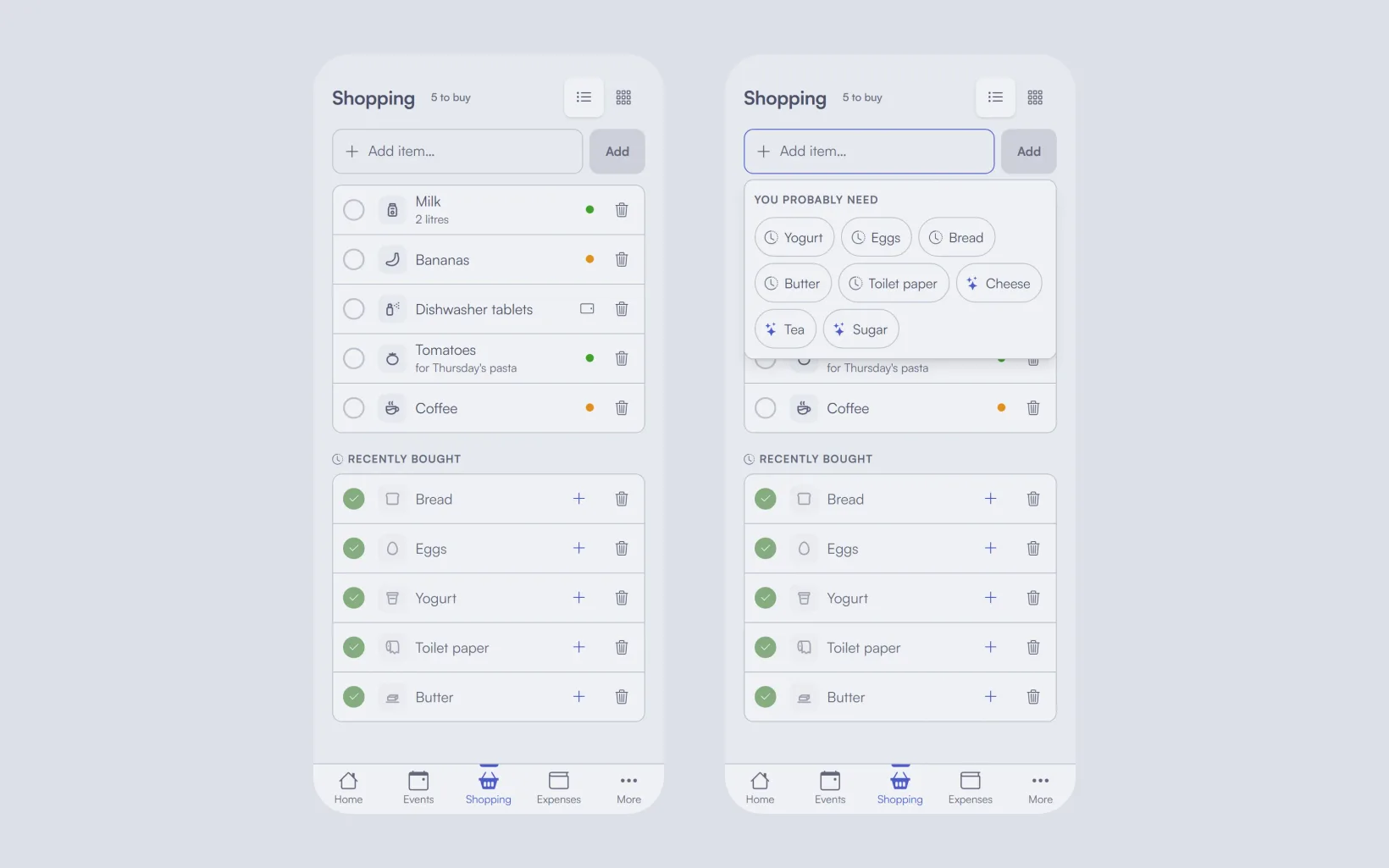
One list, the same for everyone, that anyone can add to in the few seconds after they notice something has run out. The person in the shop ticks items off as they go, so the others can see what's already in the basket. And the list remembers what you buy every week, so the regulars take one tap instead of being typed again.
Everything below is a version of those three things.
Why texting yourself stops working
The text-yourself list, the shared note and the fridge whiteboard all fail in the same place: at the moment of shopping, only one of you has the list.
A message to your partner is worse than it looks. It arrives in the middle of a conversation about something else, gets answered with a thumbs-up, and is twenty messages up by Saturday. Then there's the reply-all version: "did you get milk?" sent from the car park, while the other person is already in the queue with a second carton.
A paper list on the fridge has the opposite problem. It's easy to add to, because it's right there when you open the fridge and see the empty space, but it doesn't come with you. Somebody photographs it on the way out, and from then on there are two lists that disagree.
None of these are character flaws. They're tools that were built for something else.
Add it in the five seconds you notice it
The real work of a grocery list isn't the shop. It's noticing: the last two eggs, the washing-up liquid going watery, the coffee that'll last until Thursday. That noticing is invisible work, and it tends to pile up on one person (the chores guide has the longer argument about who should own it).
A shared list can't decide who owns the groceries. What it can do is make noticing cheap enough that anyone does it. The test we used while building ours: from pocket to item on the list in under five seconds. Any slower and people tell themselves they'll remember, and they won't.
That means adding has to be possible from wherever the noticing happens:
- On your phone, from the Shopping page, or from the + button on any page (+ → Shopping).
- From the home screen. If you've installed co-life on Android, long-press the icon for Add to shopping. (iPhone doesn't support these shortcuts.)
- On a computer, through Quick add → Shopping.
- On the kitchen wall, if you have a tablet showing the household calendar. The wall can show the list, and if you switch on Allow adding from the wall in Settings → Shopping, anyone at the fridge can add to it. The tablet can only add; ticking off and deleting stay on your phones.
Add the thing, not a sentence about the thing. "Milk" beats "we need milk again, the normal one", and the detail goes in its own field (more on that below).
One standing list, not one per trip
Lists made for a single trip die with the trip. Someone writes "Saturday shop", it gets half-ticked, and on Monday nobody knows whether the unticked half was bought somewhere else or is still needed.
A standing list doesn't have that problem, because it never ends. Things go on when they run out and come off when they're bought. There's never a "new list" to start, and nothing to copy across.
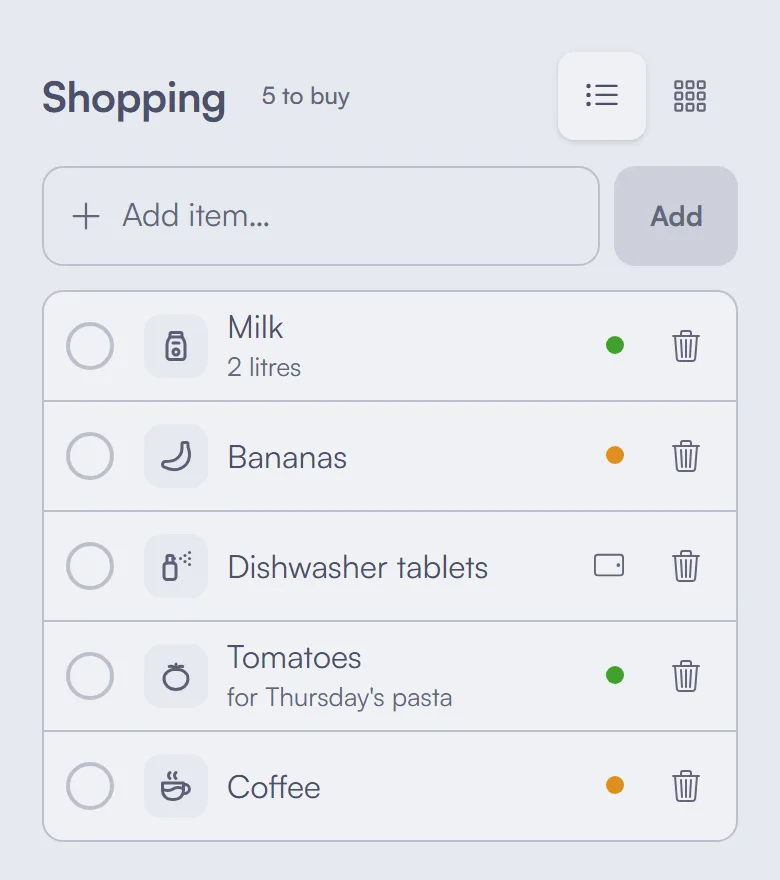
Three small things make a standing list hold up when several people add to it:
- No duplicates. If you both notice the milk, it should go on once. In co-life, adding something that's already on the list doesn't create a second copy, and while you type, matches already on the list are marked On list.
- A detail field. "2 litres", "lactose-free", "the one in the green box". This replaces the photo of the packaging you would otherwise send.
- Who added it. A dot in each person's colour shows who put something on, so "which yogurt did you mean?" goes to the right person. Items added on the kitchen screen show a small tablet instead.
In the shop: tick as you go
Tick things off as they go in the basket, not at the checkout and not from memory in the car. It feels fussy for a week and then becomes automatic.
The reason is the other person. A shared list updates on everyone's screen as soon as something changes, so if two of you split up in a big shop, or one of you is in the supermarket while the other passes the bakery, nobody buys the same thing twice. It also ends the "did you get…" texts, because the answer is on the list.
In co-life a ticked item moves down to Recently bought, and you get a few seconds to undo it if your thumb slipped. If you ticked something the shop had run out of, tap + next to it and it's back on the list.
One honest limit: the list needs signal. It loads and saves over the connection, so in a basement supermarket with no bars it won't update until you're back in range. If a tick can't be saved you'll see a message and can try again. Open the list before you go down.
Let the list remember the regulars
Most of a household's shopping is the same few dozen things on a loop. Typing them every week is the part of a list that makes people give up on it.
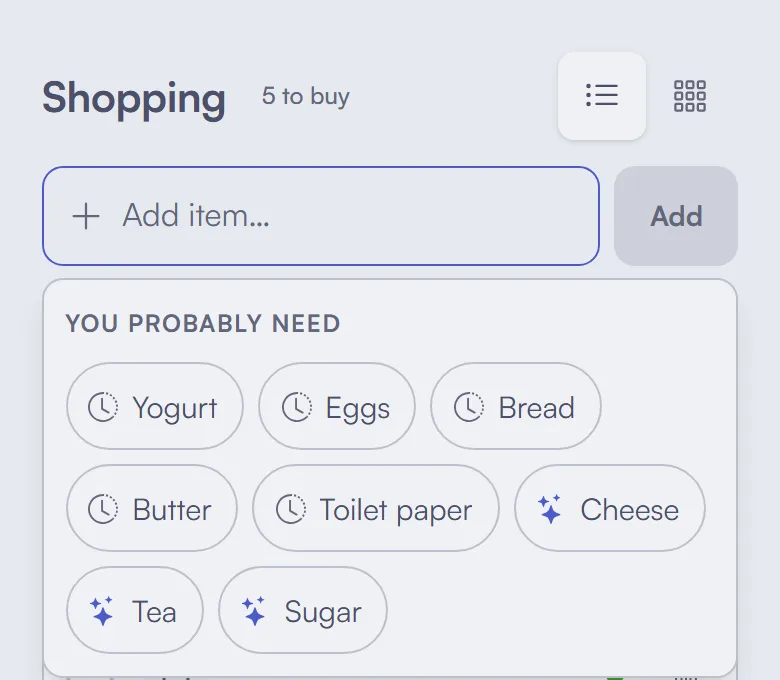
A good shared list keeps what you've bought and offers it back. In co-life, tapping the add field opens You probably need: things your household has bought before, with the ones you're about to run out of first, judged by how often you usually buy them. A brand-new household starts with everyday staples until it has some history. Anything already on the list is never suggested.
It's a small thing that changes the habit. Adding the regulars becomes a tap, so the only things you type are the unusual ones.
Should everyone get a ping when it grows?
This is the one real trade-off in a shared list, and households land on both sides.
A notification when someone adds to the list means the person passing a shop on the way home knows there's something to pick up. That's most of the value of sharing a list at all. The cost is noise: adding six things after checking the cupboards shouldn't buzz your partner's phone six times.
co-life notifies the rest of the household when you add something, and groups quick additions into one notification that grows ("Sara added to Shopping — milk, bread +2") rather than one per item. Anyone who finds even that too much can turn the push off for themselves in Settings → Notifications → Shopping list additions; the bell in the app still shows it.
Our suggestion is to leave it on for the first fortnight. If nobody is annoyed, it's doing its job.
Other ways to share a list
Plenty of tools can hold a shared grocery list, and some will suit you better. At the time of writing:
- Apple Reminders has shared lists, and a list marked as groceries sorts itself into sections. Excellent if everyone in the house uses an iPhone; useless the moment someone doesn't.
- Google Keep shares a checklist with anyone, on any phone. It's simple and free, and it doesn't remember what you bought last week.
- Bring! is a dedicated shopping-list app with big icon tiles, popular in German-speaking countries.
- AnyList goes further into recipes and meal planning, if you want the list to come out of the week's dinners.
- OurGroceries is a plain, cross-platform shared list that does the basics well.
If what you want is only a list, any of these is fine, and a dedicated list app will have features we don't. The reason to keep the list in co-life is that it's the same place as the household calendar, the shared notes and the expenses, so it's one app for everyone instead of four.
What a shared list won't fix
It won't sort your shop by aisle, track prices, or plan meals. It won't tell you what the shopping costs; that's the job of budgeting for groceries, where the receipt goes once you're home. And it won't settle who should be doing the noticing in the first place, which is a conversation rather than a feature.
What it does is take the list out of one person's pocket. The milk goes on when someone sees the empty carton, the person in the shop can see it, and nobody has to text themselves.
If you'd like one list your whole household can add to, give co-life a try. It's free to start, EU-hosted, and made for everyone who shares a home.