 co-life
Almost everyone who shares a home tries to track shared expenses in a spreadsheet first. It's free, it's flexible, and for about three weeks it works beautifully. Then one of you stops entering things, a formula gets overwritten, and the sheet quietly becomes a document nobody trusts. If that's where you are, the answer isn't a better spreadsheet — it's noticing the three things a spreadsheet structurally can't do, and using something that can.
This guide is about tracking shared expenses without a spreadsheet: why the shared sheet always rots, what you actually need instead, and how to switch without losing the one thing spreadsheets are genuinely good at.
Why the shared spreadsheet always breaks
It's never one big failure. It's four small ones that compound:
- It lives on a laptop; spending happens on your feet. You pay for groceries standing at the till, not sitting at a desk. By the time you're back at the laptop, half the day's costs are forgotten — so the sheet is always a little bit wrong, which means neither of you fully trusts it.
- One person becomes the maintainer. Whoever built it owns the formulas, the tabs, and the guilt. The other person is a guest in a document they can't fix, so they stop entering things — and now it's one person's job, which is exactly what sharing was meant to avoid.
- There's no proof, just numbers. A row says "€60, groceries." Was it? For what? Six weeks later nobody can reconstruct it, and a single disputed line can sour the whole thing.
- A stray click breaks it silently. Someone drags a cell, overwrites a total, or sorts the wrong column, and the sheet keeps showing a confident, wrong number. Spreadsheets fail quietly — the worst way to fail when the whole point was trust.
None of these are fixed by a nicer template. They're baked into what a spreadsheet is.
What you actually need instead
Strip it back and a shared-expense tracker only needs to do three things a sheet can't:
| What breaks in a sheet | What you actually need |
|---|---|
| Entry happens later, from a laptop | Log a cost in ten seconds from your phone, at the shop |
| A row is just a number | The receipt attached, so the entry proves itself |
| One person maintains the formulas | The totals maintained for you — no owner, no formulas to break |
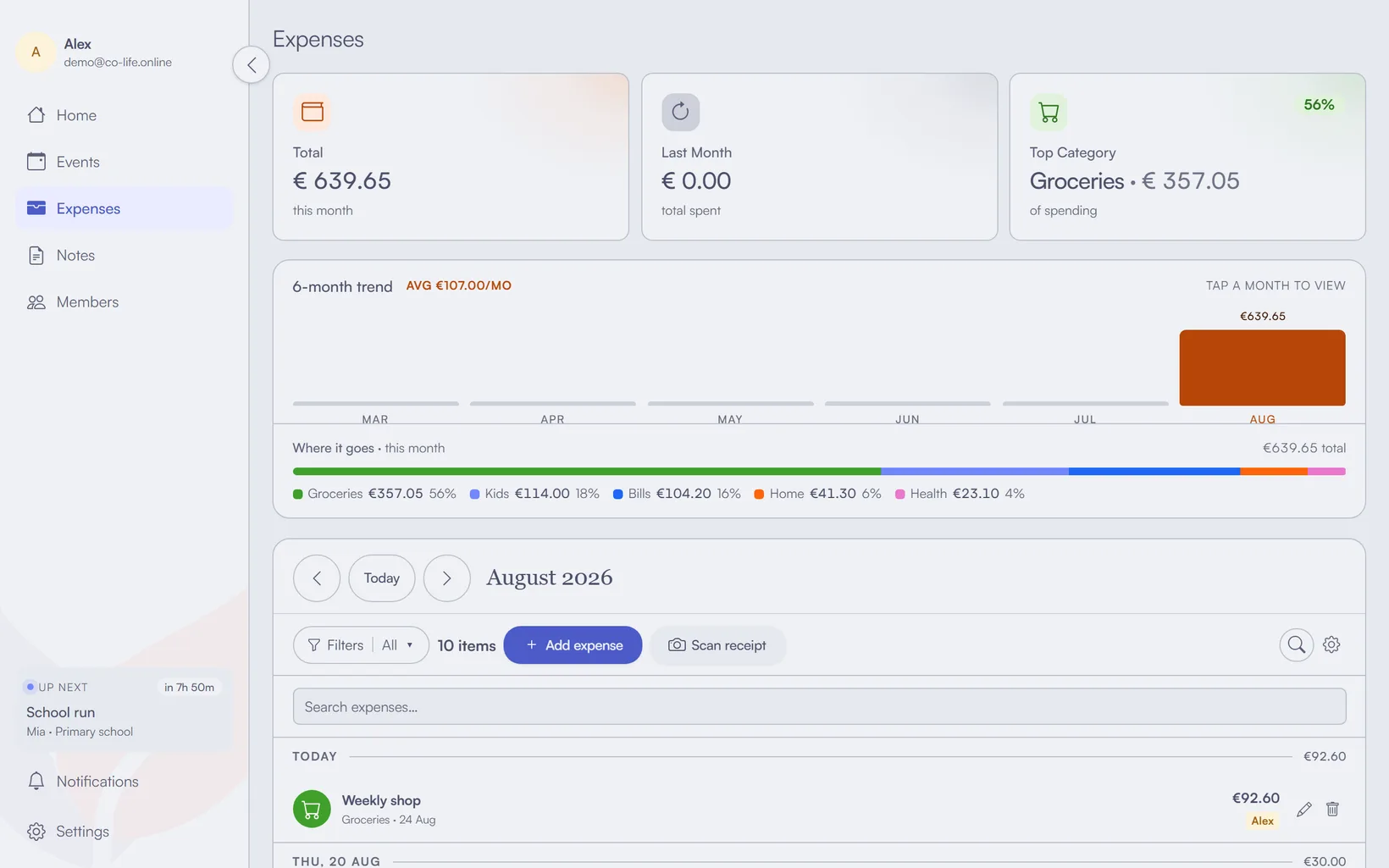
Everything else — categories, budgets, who paid — is nice, but these three are what actually make people keep using it. In co-life, adding a shared cost is a tap from the phone, you can scan the receipt to fill it in, and the monthly totals keep themselves, so there's no maintainer and no stale sheet. Once you know how you're splitting — we cover the three fair methods here — the tracking is what keeps that split honest month to month.

How does this compare to Splitwise or Tricount?
Splitwise, Tricount and Settle Up are settle-up tools: they track who owes whom and help you square up afterwards, which is exactly right for a trip, a festival or a one-off shared bill. A household tracker answers a different question — where the money goes month to month — and never really gets settled at all.
Which one you want depends on the question you are actually asking:
- "Who owes whom after the weekend away?" Use a settle-up app. That is the job they were built for and they are good at it.
- "What did we spend on groceries this month, and is that normal?" That is a budgeting question, and a settle-up ledger will not answer it. You want categories, a monthly total and a trend.
- "Both, forever." Plenty of households run a settle-up app for trips and something else for the ongoing bills. That is not a failure of either tool.
co-life is firmly the second kind: expenses by category, budgets, a six-month trend, and a who paid view showing each person's share of the month side by side. To be plain about the limit — it reports what each of you paid, and does not calculate a who-owes-whom balance. It does not know the ratio you agreed, so it will never tell you someone is ahead. If squaring up to the cent is the core of how you split, a settle-up app alongside it is a sensible pairing, and this guide would rather say so than pretend otherwise.
What do I do with my existing spreadsheet?
Don't migrate it — archive it. Keep the old sheet as a read-only record, enter your recurring bills once in the new tool, and start logging from today. There is no import that will do it for you, and re-typing rows from last March buys you nothing.
That sounds like giving up on your data, and it isn't. Three things are worth knowing:
- The recurring bills are most of the sheet. Rent, utilities and subscriptions are the rows you copied down month after month. Entered once as recurring expenses, they reproduce themselves — so the bulk of the sheet is replaced by about ten minutes of setup.
- Old one-offs are dead weight. You are not going to query what you paid for a taxi eight months ago. If you ever do, the archived sheet is still sitting there.
- You are not trading one lock-in for another. co-life exports every expense to CSV whenever you want it, so the raw numbers stay yours — see the section below.
Step by step
- Get it on both phones. The whole fix is that spending gets logged where it happens. Install the app on both your phones so either of you can add a cost the moment it lands, not that evening.
- Put the repeating bills in once. Rent, utilities, subscriptions — enter them as recurring expenses so they appear every month on their own. That's the bulk of the sheet's rows gone, and none of them can be forgotten.
- Log one-offs on the spot — and scan the receipt. When you pay for something shared, add it there and then, tag who paid, and photograph the receipt. The scan prefills the amount for you, so "on the spot" really is a few seconds.
- Let the totals keep themselves. No formulas, no maintainer. The monthly total, the category breakdown and the budget you set all update as you add costs — and so does the split between you, showing what each person paid that month and what is still untagged.
- Glance at the trend, not every row. Instead of scrolling a sheet, check the monthly view to see where the money actually went and whether a category is drifting.

"But I like my spreadsheet"
Fair — spreadsheets have one real strength: the raw numbers are yours, exportable, sortable, and yours to keep. You don't have to give that up. co-life exports every expense to CSV whenever you want it, so you can drop the data into a sheet for a tax return, a big reconciliation, or just because you like a pivot table. The difference is you're no longer maintaining a spreadsheet by hand — you're pulling one out on the rare occasion you actually need it, from data that stayed correct because nobody had to keep it correct.

The switch
Tracking shared expenses without a spreadsheet isn't about finding a fancier grid. It's about moving the logging to where the spending happens, attaching proof to each cost, and letting the totals maintain themselves — the three things a shared sheet was never going to do, no matter how good your formulas were.
If you'd like that — shared costs logged in seconds from either phone, receipts attached, the split kept up to date for you, and a CSV waiting whenever you want the raw numbers — give co-life a try. It's free to start, EU-hosted, and built for two people (or a whole household) sharing one set of expenses.