 co-life
If you and your partner keep missing each other's plans, the fix is usually not "communicate more." It's to share one calendar with your partner instead of quietly maintaining two. When both of you write to the same place, the dentist appointment, the dinner with friends, and the Tuesday you're already out all sit next to each other — so a clash is something you can see, not something you discover on the day.
This guide walks through doing it properly: one shared calendar, colour-coded per person, that both of you can read on your phones and add to in seconds.
Why one calendar beats two synced ones
Most couples start by "sharing" calendars — you invite your partner to yours, they invite you to theirs, and now each of you has two calendars layered on top of each other. It works until it doesn't. Invites get declined by accident, one person's work calendar hides personal events, and neither of you is ever quite sure which calendar an event actually lives on.
A single shared calendar removes that ambiguity. There's one source of truth, and the only question left is who an event belongs to — which a colour answers at a glance.
How do you share a Google Calendar with your partner?
On a computer, open Google Calendar, hover the calendar under My calendars, click the three dots and choose Settings and sharing. Under Share with specific people and groups, add your partner's email address and pick a permission level. On Android it is Settings → the calendar → Add people or groups.
The permission is the step people click past, and it decides what you have actually built. Google offers four levels:
- See only free/busy (hide details) — they see that you are busy, not what you are doing.
- See all event details — they can read everything and change nothing.
- Make changes to events — they can add and edit. This is the one you want for a calendar you genuinely share.
- Make changes and manage sharing — the above, plus the ability to share it onward.
Outlook has the same idea in different words: Can view when I'm busy, Can view titles and locations, Can view all details, Can edit. The labels get reworded every couple of years; the four levels do not.
Pick "make changes" and you have something workable. But notice what you have built: your partner now has edit rights on your calendar, which still belongs to you. One of you is the owner and the other is a guest. That asymmetry is what this guide is really about, and it is why the two sections below exist.
Why a shared calendar beats swapping invites
The other habit couples fall into is inviting each other to everything. It looks equivalent. It is not.
An invite creates the event on your calendar and sends a copy request to theirs. They accept, decline, or ignore it — and on a phone, in a notification shade, any of those is one mistaken tap away. Decline it and the event disappears from their side while staying on yours, so the two of you are now looking at different weeks and neither of you knows it. Change the time later and their acceptance can quietly reset to "needs action".
A shared calendar has no accept step. The event is simply there, for both of you, because it lives in one place instead of being copied between two. Nothing to decline, nothing to drift.
Step by step
- Pick one home for the calendar. Choose a place you both actually open — not the work account only one of you lives in. In co-life, a household is exactly this: one calendar that every member of the home shares, with no "whose account is this on" confusion.
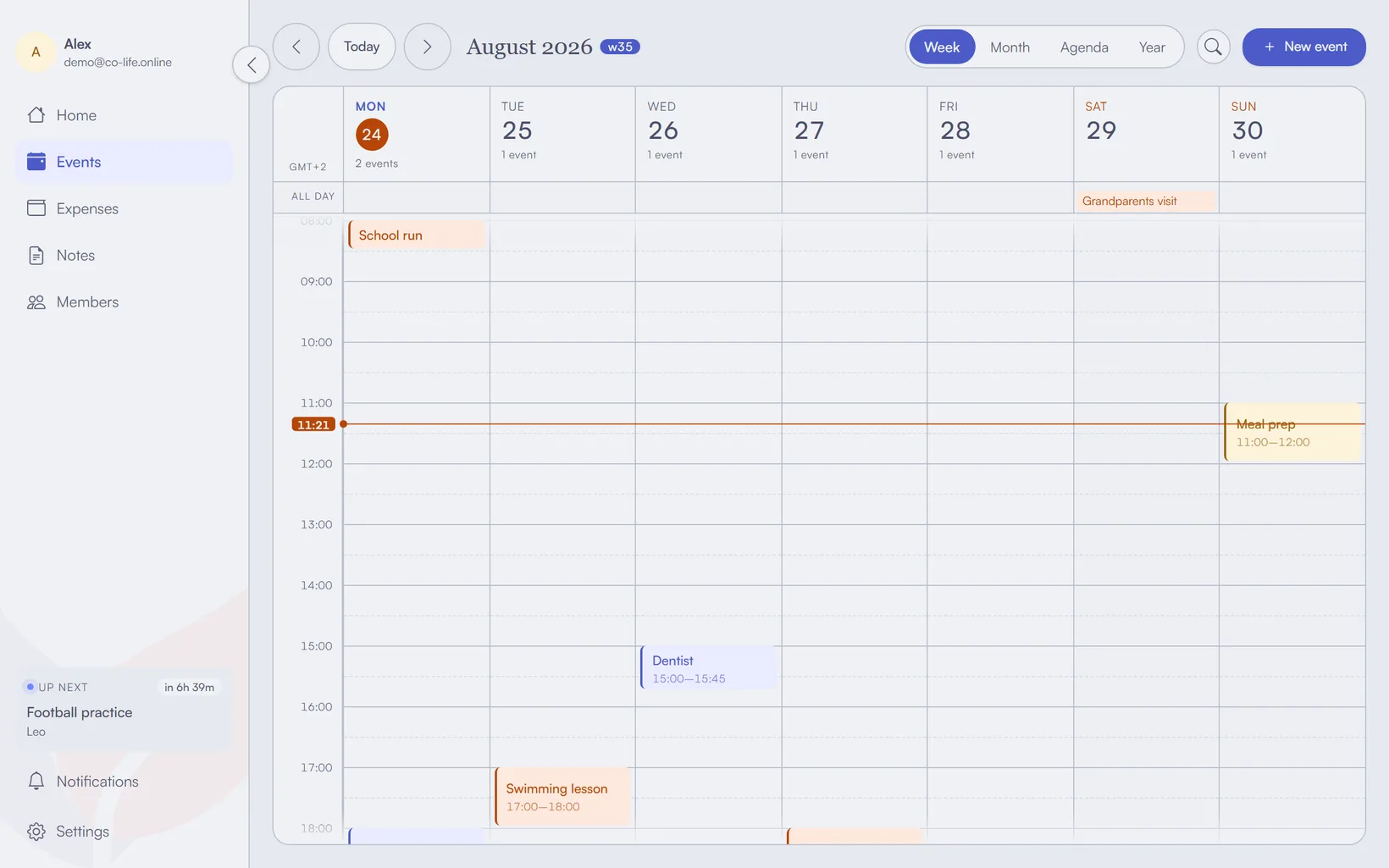
- Give each person a colour. Assign yourself one colour and your partner another (co-life does this per member — amber for one of you, mint for the other, and so on). From then on, a full week tells you at a glance who's busy without reading a single word.
- Add the recurring anchors first. Before you add one-off plans, put in the things that repeat — work shifts, the gym, a standing call with family. These are what you double-book against, so getting them in first is what actually prevents collisions later.
- Connect the calendars you already live in. You don't have to abandon Google Calendar or Apple Calendar. co-life syncs two-way with Google, so an event added on either side shows up on both. If you prefer Apple or Outlook, you can subscribe to your co-life calendar so it appears read-only alongside everything else, or do a one-off
.icsimport to bring old events over. - Put it where you'll both see it. A shared calendar only works if it's one tap away. Install the app on both phones (and a laptop if that's where your partner plans), so adding "dinner Thursday, 8" takes ten seconds from either of you.
- Agree on one tiny rule. The only discipline that matters: if it involves the other person's time, it goes in the shared calendar. Not the group chat, not a mental note. One habit, and the double-bookings stop.
The real trick isn't the app — it's colours plus one rule. When each person owns a colour and every shared plan lands in one place, a clash is visible before it happens instead of explained after. co-life even shows an inline hint when a new event overlaps an existing one, so you catch it while you're still typing.
Sync or subscribe — which one do you want?
These two words get used interchangeably and cause a lot of confusion, so it's worth being precise:
| Two-way sync | Subscribe (read-only) | |
|---|---|---|
| Direction | Changes flow both ways | You only see the calendar, can't edit it |
| Good for | The calendar you both actively add to | Glancing at a calendar inside an app you already use |
| co-life | Google Calendar | Apple Calendar, Outlook (via the iCal feed) |
Rule of thumb: sync the calendar you both edit, subscribe to it from anywhere you just want to look. Mixing the two — syncing on one phone, subscribing on the other — is the most common cause of "why did my event disappear."
What about Google Family or Apple Family Sharing?
Both platforms have a free built-in option, and for some households it is genuinely enough.
Google gives a family group a shared Family calendar everyone in the group can see and edit. Apple does the same through Family Sharing, with a shared calendar in the Calendar app. Both are free, both are already on the phone, and if a calendar is the whole of what you need, try them before you install anything else.
Two limits are worth knowing before you commit. Each one ties you to a single ecosystem — an Apple family calendar is awkward for the Android partner, and the reverse is just as true — so a mixed-phone household ends up back where it started. And a calendar on its own does not touch the other two things a shared home runs on: the money and the things one person is quietly remembering.
What else is out there
Dedicated couple apps cover this ground too. Cupla pulls Google, Apple and Outlook into a single two-person view and adds shared lists; Between and FamCal are in the same territory. If a shared calendar and a to-do list is all you are missing, any of them will do the job.
co-life is aimed at a wider slice — the calendar and the shared expenses and the notes — on the argument that for two people running a home they are really one problem. If the calendar is the only part you are struggling with, you may not need it, and the honest recommendation is to use whichever of the above is already on your phone.
What actually stops the double-booking
Apps don't prevent clashes; visibility does. Once every plan that touches both of you lives in one colour-coded calendar you both keep on your phones, a conflict stops being a surprise. You'll see "he's already out Thursday" before you say yes to Thursday — which is the whole point.
If you'd like a shared calendar built for exactly this — one household, one calendar, a colour per person, and syncing that plays nicely with the calendars you already use — give co-life a try. It's free to start, EU-hosted, and made for two people (or a whole home) sharing one plan.